2010 Bagger Fuel pump wont engage.

41bigdawg

Let the Big Dawg eat !
Hey guys I pulled the relays and tested them and they work fine. When I turn the key on and hit the run button shouldn't I hear the click from the relay?

If I hook up my computer to the VFI and use Protune would that software tell me anything?
Pro tune will throw a code for the issue and may lead you in the right direction.
 

Ernie12

Active Member
I have the VFI with the serial port so I got a serial port to USB adapter. Windows10 loaded the adapter on Comm 3 but when I turn the key on and hit the run button and then plug in the USB it does not find the hardware for the bike. The software cant find it for some reason.
 

Ernie12

Active Member
Just thought I would give an update. I have been working with Curtis through Email and he helped me out telling me what to test so I could narrow down the problem. It turns out it was a bad ground at the EFI relay plug. I took it off the side of the battery box to get to the wires better to check the ground on it and the continuity readings were all over the place with two different meters. So I put the relay back in the plug with it just hanging there and the pump powered up like it is supposed to. Also I was able to connect my laptop to the VFI now and it worked so now I have to secure that ground wire in the plug so it does not vibrate loose again or wiggle around.


Thanks Curtis :old2::cheers:
 
Last edited:

SKOGDOG

One of the old ones.
Glad you solved the issue!! Curtis is one of the best!!
Same issues connecting my 2010 Bagger when I needed to clear a check engine light. I looked all over for an old laptop with the correct 9 pin serial port, to but no avail. The cable only uses three of the pins. I read the instructions from the Protune II download from S&S, and had a friend make me a cable with the correct serial port 3 pin connection (he simply removed the unneeded pins) to connect to the bike, and attached a 9 pin/USB adapter to connect to the laptop. I hooked it all up but the software would not detect a signal from the bike.
Roger had a connector (Thunderheart?) from an ignition module he bought some time back for his K9. It was a 9 pin serial port to USB, and using that with my cable, it worked like a charm.
If you have an old laptop with a 9 pin serial port you can make a 3 pin cable and be in business. I found any old adapter (9 pin to USB) would not work-S&S made a one that was proprietary, but they are no longer sold.
Although limited in my ability to sensibly discuss technology, here is what I did to get connected to clear my check engine codes:

Downloaded Protune II from the S&S website to the laptop. The only serial port on it is an 11 pin (useless in this case) and of course USB ports. S&S warns not to use a standard 9 pin serial port cable/connector, as it will allow excess current to pass thru that could damage the computer, as I remember. Be sure to go to the S&S website and look at the info accompanying the Protune II software, as it explains this.
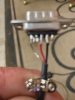
Went to a tech buddy of mine and asked him to make a 3 pin serial port cable following S&S instructions (using a 9 pin—they simply didn’t wire unneeded pins. I think you could also just snip the unneeded pins out too. Mine was made with three wires.
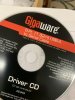
I borrowed the adapter from Blacktopper—he has the cable too— (If you PM him and say you know Mastiff Dave or Mr. Wright, I bet he’d let you borrow it). See photo below of the adapter driver that came with the cable.
View attachment 78412

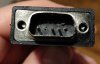
Sorry for the fuzzy picture, but you can tell which pins are used.

A112D466-3572-4627-8618-629E42F3B30A.jpeg
FDF7B6DE-24FE-441F-9DBB-6248EC7CC6B2.jpeg

This is the package for the cable that Blacktopper bought that allowed the connection.
 

Ernie12

Active Member
Glad you solved the issue!! Curtis is one of the best!!
Same issues connecting my 2010 Bagger when I needed to clear a check engine light. I looked all over for an old laptop with the correct 9 pin serial port, to but no avail. The cable only uses three of the pins. I read the instructions from the Protune II download from S&S, and had a friend make me a cable with the correct serial port 3 pin connection (he simply removed the unneeded pins) to connect to the bike, and attached a 9 pin/USB adapter to connect to the laptop. I hooked it all up but the software would not detect a signal from the bike.
Roger had a connector (Thunderheart?) from an ignition module he bought some time back for his K9. It was a 9 pin serial port to USB, and using that with my cable, it worked like a charm.
If you have an old laptop with a 9 pin serial port you can make a 3 pin cable and be in business. I found any old adapter (9 pin to USB) would not work-S&S made a one that was proprietary, but they are no longer sold.
Although limited in my ability to sensibly discuss technology, here is what I did to get connected to clear my check engine codes:

Downloaded Protune II from the S&S website to the laptop. The only serial port on it is an 11 pin (useless in this case) and of course USB ports. S&S warns not to use a standard 9 pin serial port cable/connector, as it will allow excess current to pass thru that could damage the computer, as I remember. Be sure to go to the S&S website and look at the info accompanying the Protune II software, as it explains this.
Went to a tech buddy of mine and asked him to make a 3 pin serial port cable following S&S instructions (using a 9 pin—they simply didn’t wire unneeded pins. I think you could also just snip the unneeded pins out too. Mine was made with three wires.
I borrowed the adapter from Blacktopper—he has the cable too— (If you PM him and say you know Mastiff Dave or Mr. Wright, I bet he’d let you borrow it). See photo below of the adapter driver that came with the cable.
View attachment 78412

Sorry for the fuzzy picture, but you can tell which pins are used.

View attachment 78413
View attachment 78414

This is the package for the cable that Blacktopper bought that allowed the connection.

Hey Skogdog , yea I watched the youtube video that S&S put out that explains about the cables. They mention that BestBuy carries one that works if you remove the extra pins. So I bought one there , Insignia USB to RS-232 Serial Adapter. After I fixed The negative issue with the relay plug it all worked ok. I took this adapter and needle nose pliers to break off the ones you dont need.

switch copy.jpg
 

SKOGDOG

One of the old ones.
Hey Skogdog , yea I watched the youtube video that S&S put out that explains about the cables. They mention that BestBuy carries one that works if you remove the extra pins. So I bought one there , Insignia USB to RS-232 Serial Adapter. After I fixed The negative issue with the relay plug it all worked ok. I took this adapter and needle nose pliers to break off the ones you dont need.

View attachment 78428
Good catch, Ernie!! I only read the manual, didn’t think to search youtube—not because I’m dumb, but I just like to eveything the hard way—builds character, y’know!! Haha Great post with the adapter source—all the guys with EFI should benefit from it.
 
Last edited:
Top